I have added support for reading C2PA metadata to my photo forensics tool Forensically. C2PA is the Coalition for Content Provenance and Authenticity. In their own words:
The Coalition for Content Provenance and Authenticity (C2PA) addresses the prevalence of misleading information online through the development of technical standards for certifying the source and history (or provenance) of media content.
The C2PA metadata is signed and optionally timestamped using a timestamp authority.
Cryptography & PKI
It’s important to note that digital signatures do not inherently guarantee trustworthiness. Even if the scheme is cryptographically sound you still need to trust everyone and everything with access to the keys.
Sadly the C2PA Javascript library doesn’t reveal a lot of useful information, essentially just the Organization of the Subject from what I can tell.
There is a “known certificate list” and an email address to send in your certificate to be included. I’m not exactly sure what information is validated before a certificate is included.
As is, I’d take the signatures displayed in Forensically with a big pinch of salt.
There are definitely use cases where having remote manifests makes sense, for instance to keep the file size of an asset small. They can however be used as beacons to track a person viewing the metadata.
For Forensically I have decided to disable support for remote manifests, both using configuration options and by blocking requests using a Content Security Policy.
File Sizes
Another little headache while implementing this was the size of the c2pa-js library. Using my Vite setup it compiles down to about 350 kB for the main ES module, 165 kB for a worker and 5.4 MB for the WebAssembly module.
To mitigate the impact of this I’m lazy loading the library only when needed. This brought up another issue, how do I figure out whether an image contains C2PA data without loading all of that code?
There is the @contentauth/detector package for that but it also weighs about 70 kB of WASM and JavaScript.
Ultimately, I wrote my own detection code. Luckily the pattern to be searched for doesn’t repeat the initial byte anywhere. So searching for it can be done efficiently using a simplified version of Knuth-Morris-Pratt.
My JavaScript implementation weighs about 300 bytes after minification.
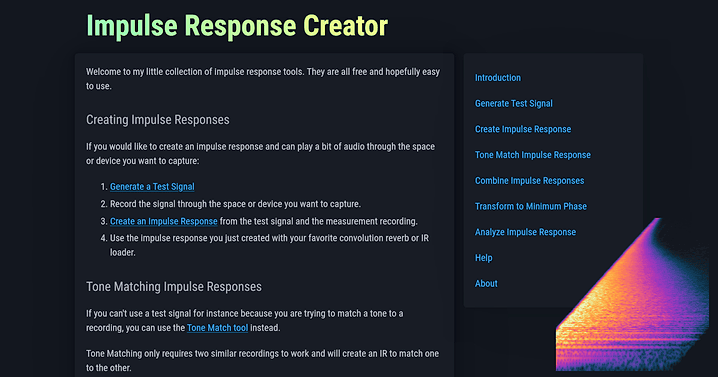
I got a little bit obsessed with convolution reverb and measuring impulse responses over the last few weeks. As part of that I’ve built myself a few command line tools to create and process impulse responses. I have now bundled these up into a web application, in the hope that they may be useful to others.
What are impulse responses and convolution reverbs
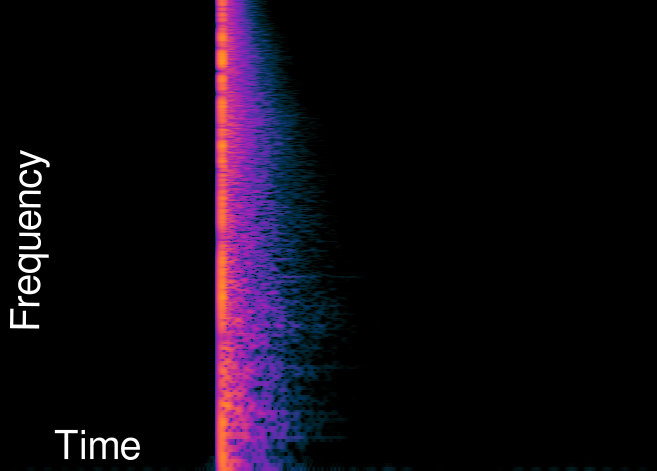
If you want to evaluate the acoustics of a room you are in, you can clap your hands and listen to the echos and reverberation of the clap. An impulse response is very similar to that. It’s the response of a system to being excited with a short impulse like the clap in the example before.
The impulse response can then be used to simulate the sound of the room using a process called convolution.
An easy way to think of this is that for every point on the input signal the impulse response is played back with the volume (and polarity) adjusted to match the input.
This cascade of echos will then match what that input would have sounded like in the room.
This principle isn’t limited to rooms, speaker cabinets, or audio. It works for any linear time-invariant sysyem.
Capturing Impulse Responses
Spectrogram of the Impulse Response of a room.
In practice capturing accurate impulse responses is a bit more difficult than just clapping. Ideally the impulse used to excite the system is very brief. Infinitesimally brief. In order to get a good signal to noise ratio it should also be very loud, to get as much energy as possible into the system with that brief pulse.
The impulse generated by clapping hands isn’t very short, very intense, or easily reproducible.
Better options are popping balloons or firing starter guns.
Those methods are better than clapping but still far from ideal.
Can we avoid using an impulse to capture an impulse response?
Sweeping Sines
If we look at the problem from a frequency perspective an alternative approach becomes evident.
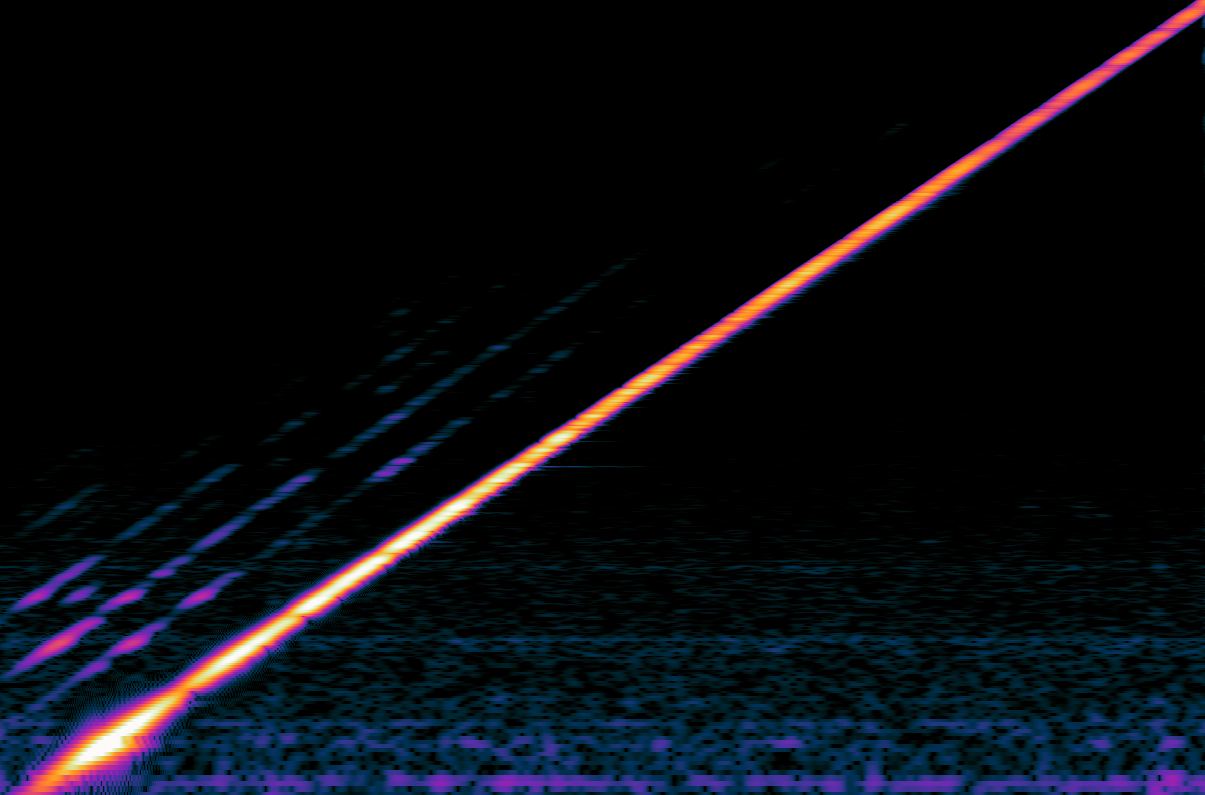
An ideal impulse is a short burst containing all frequencies at once. Instead of sending out all frequencies at once, we can send out different frequencies over time. To do so we can use a simple sine wave with a changing frequency over time. This test signal is also known as a sine sweep or chirp.
Now instead of an infinitesimally short pulse we can take as much time as we would like to send out our signal. This makes it easier to get a good signal to noise ratio and is much kinder to the equipment being measured.
Spectrogram of a sine sweep.
Response to the sine sweep.
Note: The parallel lines above the sine sweep are due to harmonic distortion introduced in my measurement process. The horizontal noise are due to hum while measuring. Turns out getting good measurements in the real world is hard. But we can deal with those artifacts.
Deconvolution
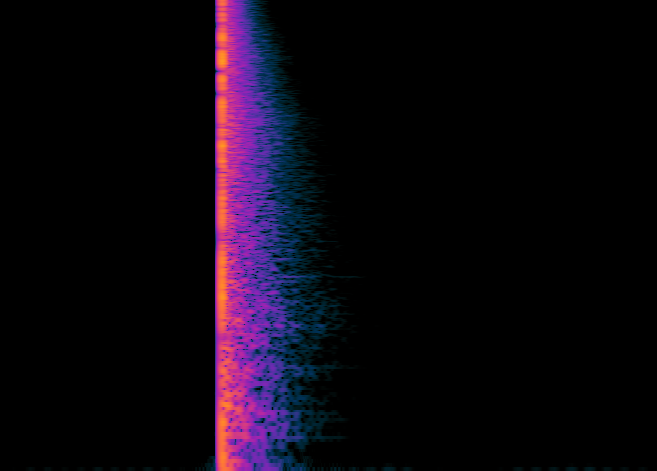
There is just a tiny little problem, the response to our sine sweep isn’t a crisp impulse response instead it’s smeared out over time just like our test signal is. In order to get the impulse response we need to undo this smearing over time. This process is called deconvolution and it transforms the response to the sine sweep into an impulse response.
Response to the sine sweep after deconvolution.
Looking at the spectrogram in visual context, this boils down to shearing.
If this explanation was a bit too handwavy, I suggest reading the paper by Angelo Farina. He strikes a good balance between detail and accessiblity.
Web Implementation
After having played around a bit with my CLI implementation I’ve realized that there aren’t (m)any easy to use online tools for creating impulse responses. So I went the extra mile and added a little web ui in the hope that this - admittedly very niche tool, might be useful to others.
All the DSP code for this project is implemented in Rust and compiled to wasm. The UI is written in Typescript and uses React. Everything is bundled up using vite and wasm-pack.
I’ve also written some integration tests using Playwright. Using Playwright was rather nice and low friction so I will likely it again in future projects.
Limitations
While there is a UI and a bit of plumbing for normalizing and trimming the generated impulse responses the core of the code is still what I’ve written for my experiments.
There are still many rough edges and potential for improvement. One obvious area is improved noise reducation, especially with regards to impulse noise) which lead to chirps leaking into the deconvolved impulse response.
Demo
Finally a little demo of what this can sound like.
At first the arpeggio is played back without added reverb,
then convolved with a measurement my room and finally convolved with the
impulse folded back onto itself with some feedback for an ambient effect.
In 1834 Johann Heinrich Scheibler recommended using 440 Hz as the standard frequency for A4. For various reasons a lot of music deviates from that. Deviating from 440 Hz has its artistic merits and can give music a different feeling and timbre.
It’s an annoyance if you have to retune your instrument slightly for every song you want to play along with.
It is possible to shift the pitch of a piece of music instead, and I have written a pitch shifter called Timestretch Player to do just that. But finding the exact pitch offset is still tedious.
So being fed up with retuning my guitar to play along with some song supposedly tuned to match the pitch of an anvil being struck with a hammer in the intro I decided to build myself a little tool to automate the process.
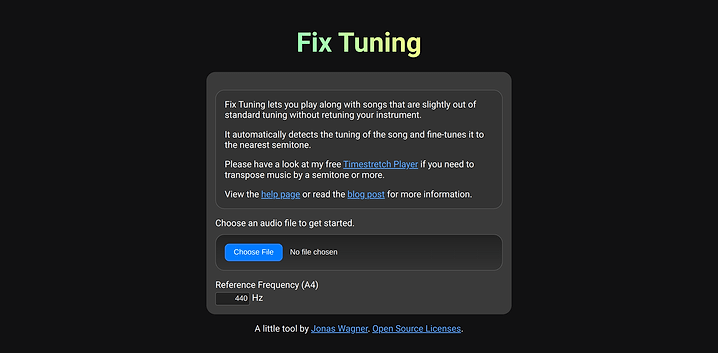
Fix Tuning automatically detects the tuning offset from a reference pitch (usually 440 Hz) in cents (¹⁄₁₀₀ of a semitone) and corrects it by slightly changing the playback speed.
Implementation
The pitch offset detection works by detecting the fundamental frequency of harmonic signals in the audio file.
It then calculates their delta from the closest note in the 12 tone equal temperament scale.
Finally it calculates the pitch offset that will minimize the deltas.
Because the changes in pitch required to correct the offset are fairly small, I’ve opted to correct them by changing the playback speed rather than using a more advanced pitch-shifting method. In my opinion, the 3% difference in speed required to correct an offset of half a semitone is less noticeable than artifacts introduced by changing the pitch independently of the tempo. For high-quality resampling I’m using the rubato crate.
The DSP code is written in Rust and compiled to WebAssembly, while the web ui is built with plain typescript wired up using vite and wasm-pack.
Limitations
The pitch detection assumes a 12 tone equal temperament scale and doesn’t account for key or tonal center.
It simply tunes the audio to align most closely with a 12 tone scale based on the reference frequency.
While the pitch detection is fairly robust due to averaging over the entire song,
it will still struggle with music that is mostly atonal.
Most testing has been done with a small number of songs and short synthetic snippets.
For the songs I’ve established the ground truth by ear. Hopefully good enough
for quick validation, not good enough for fine tuning.
Lastly the web audio api used to decode the files resamples the decoded audio to sample rate
it is internally using. This isn’t ideal but I think negligible in practice.
Why no AI?
Machine learning or “ai” would certainly lend itself to this problem. Already back in 2018 CREPE has shown that convolutional neural networks are well suited for pitch estimation. End-to-End Musical Key Estimation Using a Convolutional Neural Network shows that estimating the tonal center is possible as well. Estimating the tonal center would be fairly difficult with my current approach as it involves a lot of cultural and musical conventions that are difficult to capture in a simple algorithm.
However building up a suitable dataset for this use case, training and testing different architectures is quite a bit of work. Running inference in a web browser also tends to be non-trivial.
So I think given the current scope of the project going with a simple hand coded algorithm was the right call.
Next Steps
It could be interesting to integrate the pitch offset detection into my Timestretch Player. I’m also working on another guitar tuner, there “Tune to Song” could be a nice feature.
I’ve just released version 4.0 of simplex-noise.js. Based on user feedback the new version supports tree shaking and cleans up the API a bit. As a nice little bonus, it’s also about 20% - 30% faster.
It also removes the bundled PRNG to focus the library down to one thing - providing smooth noise in multiple dimensions.
The API Change
The following bit of code should illustrate the changes to the API well:
// 3.x forces you to import everything at once
import SimplexNoise from 'simplex-noise';
const simplex = new SimplexNoise();
const value2d = simplex.noise2D(x, y);
// 4.x allows you to import just the functions you need
import { createNoise2D } from 'simplex-noise';
const noise2D = createNoise2D();
const value2d = noise2D(x, y);
Tree shaking
Thew new API enables javascript bundler to perform tree shaking.
Essentially dead code removal based on imports and exports.
Tree shaking reduces the size of bundled javascript by leaving out code that isn’t used. As author of a library it enables me to worry less about the bundle size impact of features that might not be used by the majority of users.
A little demo to celebrate
The release of 4.0 and getting over 1’000 stars on github was a good excuse to write a little demo to celebrate.
For some extra fun I’ve decided to constrain myself to code a bit like I did in 2010 again. Canvas 2d only. No WebGL. :)
The performance implications of that decision are pretty terrible but it’s not like the world needs a demo to proof that quads can be rendered more quickly anyways. ;)
The demo uses 2 octaves of 2d noise from simplex-noise.js in a FBM configuration. The noise is then modulated with a few sine waves to create a twisting road, mountains and more flat plains.
At the highest resolutions the demo is pushing 4096 quads/frame! A bit more than the SuperFX Chip on SNES could handle. ;)
If you are interested in more details the code is available on github.
The future
With tree shaking reducing the impact of rarely used code it could be fun to add a few more features to simplex-noise.js in the future. A few ideas that come to mind are:
Noise with a controllable period (aka tileable noise)
Noise in 1D
More random noise using a (better) hash function like xxhash
A little while ago I came across an interesting post on reddit on how a wood displacement map can enhance the look of 3D prints.
Just a bit before I also played with the fuzzy skin feature in prusa slicer 2.4.
That made me wonder whether the wood effect could be achieved directly in the slicer by tweaking the fuzzy skin feature.
I had a quick look at the prusa slicer source and it looked like it would be fairly easy to add.
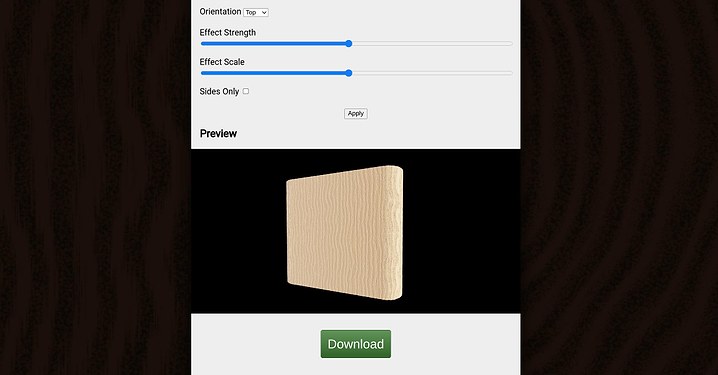
To prototype the idea and gauge whether there is any interest in it I decided that it would be best to create a little web app using three.js.
For the effect to just work I had to avoid uv maps.
Instead I’m using a basic volumetric (3d) procedural wood texture
derived from sine waves and a bit of noise.
Preliminary results
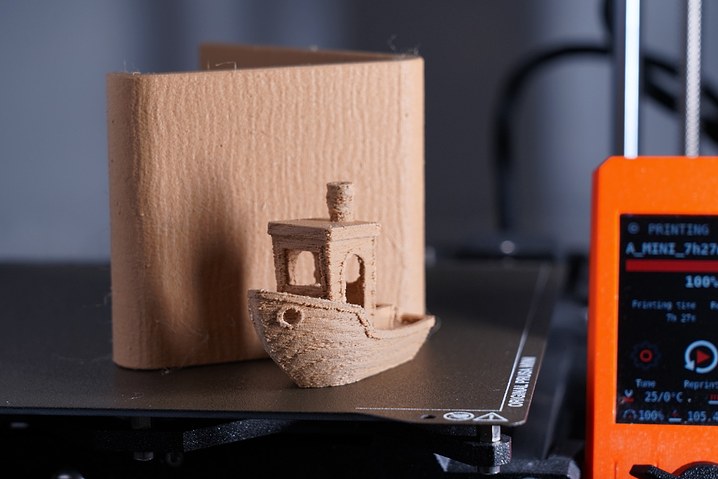
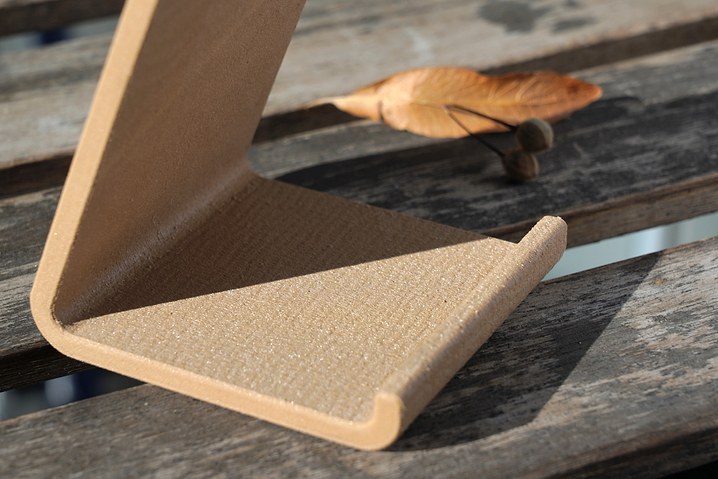
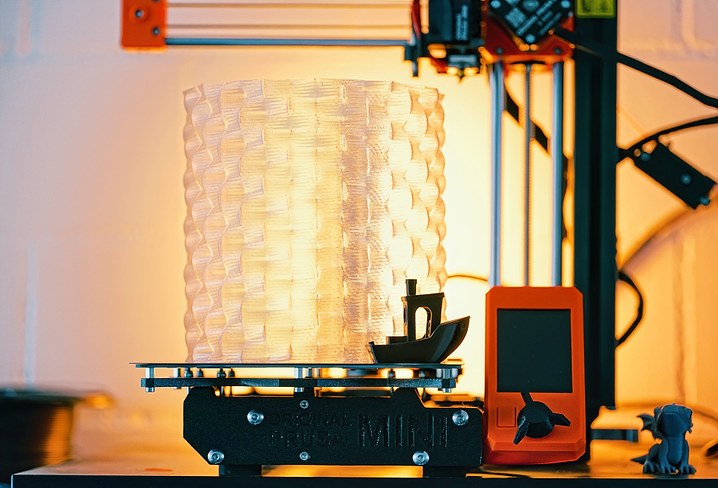
To test the process I designed and printed a very simple phone stand and a 3D benchy using Polymaker PolyWood filament.
Benchy and phone stand on the prusa mini.
The phone stand lit by the sun.
Known issues
When processing STL files I first tesselate the geometry and then perform the displacement mapping.
Luckily there is a simple tesselator built into three.js which I could use. Unfortunately it creates t-juction (when running out of iterations).
The displacement mapping can also lead to self intersections.
I also included a process for directly modifying G-code to test how
this process could work when integrated into the slicer.
When processing g-code I simply look for the perimeter comments inserted by prusa slicer and modify the G1 movement commands.
Moves are currently not sub divided.
So the tool is far from perfect but I’m quite happy with the results I got from it so far.
Possible future work
If there is enough interest in texturing features like this I think it would be pretty cool to integrate them directly into the slicer.
Obviously the wood effect isn’t the only pattern that could be achieved with this approach. Playing with different textures could definitely be fun as well.
I enjoy the swirly blur in the out of focus regions that certain lenses like the historic Petzval produce.
This effect is also known is swirly bokeh.
Just not quite enough to own such a lens myself (yet).
Instead I’ve chosen to emulate it by 3d printing a special lens hood
for my Sony FE 55/1.8 lens.
How to get swirly bokeh with a lens hood
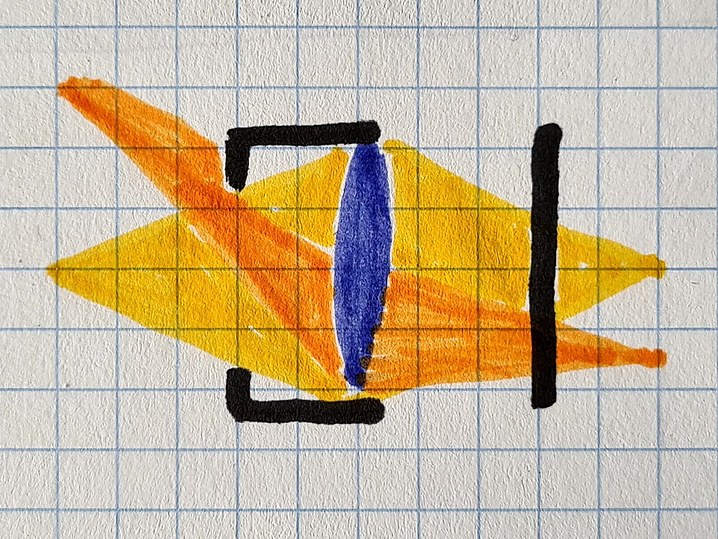
A similar effect to the one produced by these old lenses can be achieved using a lenshood
that restricts the paths light can take into the lens.
The swirly effect is essentially created by the opening of the lens hood being to small.
This creates mechanical vignetting (also known as cat’s eye bokeh),
blocking part of the light from hitting the sensor.
The light coming from the left (yellow, orange) is partially blocked by the lens hood (black) before hitting the lens (blue) and finally the sensor on the right (black).
In most lenses that produce this effect the vignetting happens somewhere inside the lens but the effect it has is similar.
3D printing a swirly bokeh lens hood
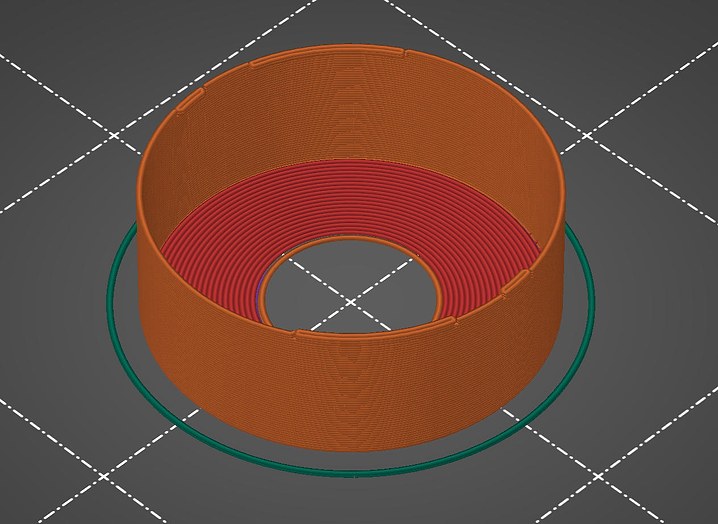
To test out how well this works in practice I modelled such a restrictive lens hood in freecad.
Preview of the 3D print.
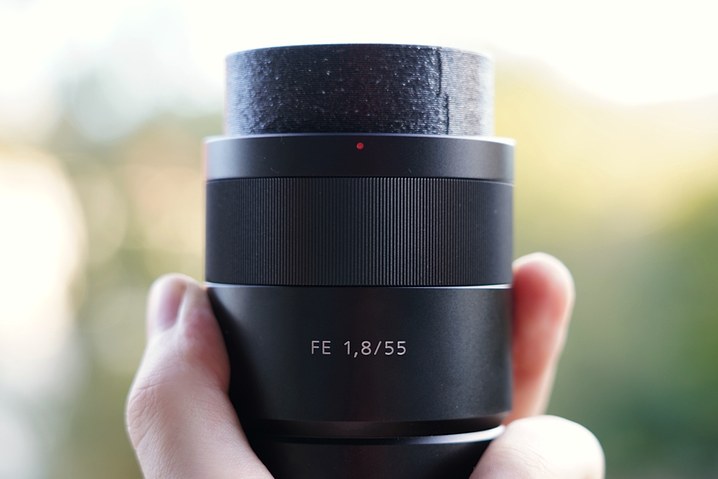
Finished product.
Definitely not the cleanest print but at a material cost of about 20 cents (EU/US) and a print time of about 15 minutes it’s well worth it.
Results
Crop of the top right corner of some city lights at night.
Want to make your own?
I’ve thrown the source files up in a github repo for you to use jwagner/swirly-lens-hoods.
With that said, I’m a very inexperienced CAD user and in this case didn’t even try to create something clean.
If you can you might be better of just remodelling it to fit your own lens rather than trying to adapt it.
I didn’t have any lamp shades in my appartment since moving out from my parents place.
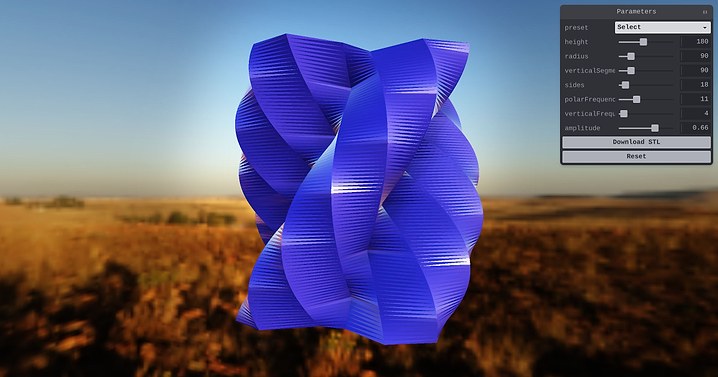
I’ve decided to change that and have some fun while doing it by building a generator for lamp shades.

I’ve started by generating n-gons. A hexagon in this example.

In order to make the result a bit more visually appealing I then
modulated the distance from the center (radius) of each vertex
using a sine wave. This results in some interesting shapes due to aliasing.
To move into the third dimension I extrude the shape and shift the
phase of the sine wave a bit in order to twist the resulting shape.
3D Printed results
Here is what one of the models looks like in the real world.
3D printed in vase mode (as a single spiral of extruded plastic)
out of PETG using a 0.8mm nozzle.
I first learned about the fourier transform at about the same time I started to play guitar. So obviously the first idea that came to my mind at that time was to build a tuner to tune my new guitar. While I eventually got it to work the accuracy was terrible so it never ended up seeing the light of the day.
Fast forward a bit over a decade. It’s 2020 and we are fighting a global pandemic using social distancing.
I obviously tried to find ways to directly address the issue with code but in the end there is only so much that can be done on that front and a lot of really clever people on it already.
So rather than coming up with another well intended but flawed design of a mechanical ventilator I decided to revisit this old project of mine. :)
So what’s in it?
The tuner has been built with a whole lot of web tech like getUserMedia to access the microphone, WebAudio to get access to the audio data from the microphone as well as web workers to make it a bit faster. Framework wise I used React and TypeScript.
With that out of the way, the rest of the article will focus on the algorithm that makes the whole thing tick.
Disclaimer
In the following sections I will oversimplify a lot of things for the sake of accessibility and brevity.
If you already have a solid understanding of subject please excuse my oversimplifications.
If you don’t keep in mind that there is a lot more to learn and understand than what I will touch on in this description.
If you want to go deeper I highly recommend reading the papers by Philip McLeod et al. mentioned at the end. They formed the basis of this tuner.
Going beyond the fourier transform
Initially I decided to resume this project from where I stopped years ago, by doing a straight fourier transform on the input and then selecting the first significant peak (by magnitude).
The naive spectrum approach of course still works as badly as it did back then.
In slightly oversimplified terms the frequency resolution of the discrete short-time fourier transform is sample rate divided by window size.
So taking a realistic sample rate of 48000 Hz and a (comparably large) window size of 8192 samples we arrive at a frequency resolution of about 6 Hz.
The low E of a guitar in standard tuning is at ~82 Hz. Add 6 Hz and you are already past F.
We need at least 10x that to build something resembling a tuner.
In practice we should aim for a resolution of approximately 1 cent or about 100x the resolution we’d get from the straight fourier transform aproach.
There are approaches to improve the accuracy of this approach a bit, in fact we’ll meet one of them a bit later on in a different context.
For now let’s focus on something a bit simpler.
Auto correlation
Compared to the fourier transform autocorrelation is fairly simple to explain.
In essence it’s a measure of how similar a signal is to a shifted version of itself. This nicely reflect the frequency, or rather period of the signal we
are trying to determine.
In a bit more concrete terms it’s the product of the signal and a time shifted version of the signal.
In simplistic Javascript that could look a bit like this:
function autoCorrelation(signal) {
  const output = [];
  for(let lag = 0; lag < signal.length; lag++) {
    for(let i = 0; i + lag < signal.length; i++) {
      output[lag] += signal[i]*signal[i+lag]
    }
  }
  return output;
}
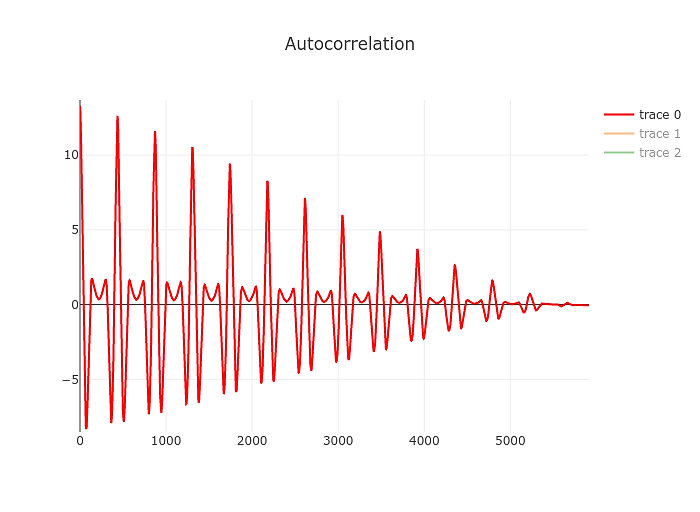
The result will look a bit like this:
Just by eyeballing it you can tell that it’s going to be easier to find the first significant of the autocorrelation compared to the spectrum yielded by the fourier transform above. Our resolution also changed a bit, this time we are measuring the period of the signal. Our resolution is limited by the sample rate of the signal. So to take the example above the period of a 82 Hz signal is 48000/82 or 585 samples. Being off by a sample we’d end up at 82.19 Hz. Not great but at least it’s still an E. At higher frequencies things will start to look different of course but for our purposes that’s a good point to start.
Now that we have the graph above we’ll need a robust way of determining the first significant peak in it, which hopefully will also be the perceived fundamental frequency of the tone we are analysing.
We’ll do this in two steps, first we will find all the peaks after the initial zero crossing. We can do this by just looping over the signal and keeping track of the highest value we’ve seen and it’s offset. Once the current value drops bellow 0 we can add it to the list of peaks and reset our maximum.
From this list we’ll now pick the first peak which is bigger than the highest peak multiplied by some tolerance factor like 0.9.
At this point we have a basic tuner. It’s not very robust. It’s not very fast or accurate but it should work.
Improving accuracy
The autocorrelation algorithm mentioned above is evaluated at descrete steps matching the samples of the audio input, that limits our accuracy.
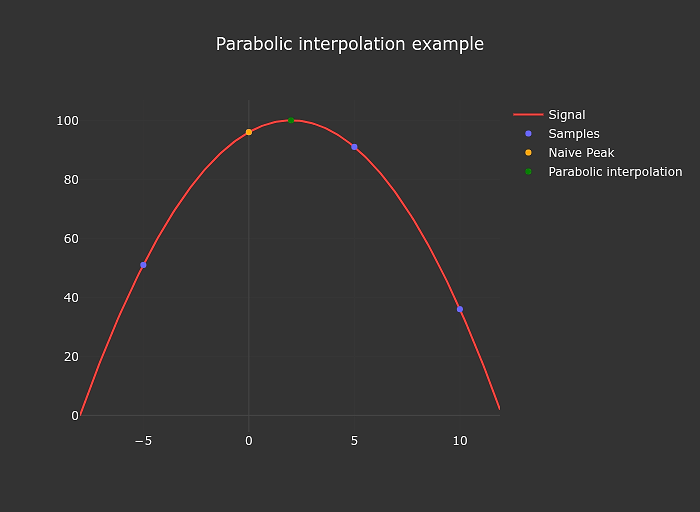
We can easily improve on this a bit by interpolating.
I use parabolic interpolation in my tuner.
The implementation of this is also extremely simple
function parabolicPeakInterpolation(a, b, c) {
  const denominator = a - 2 * b + c;
  if (denominator === 0) return 0;
  return (a - c) / denominator / 2;
}
Improving reliability
So far everything went smoothly. I had a reasonably accurate tuner for as long
as I fed it a clean signal (electric guitar straight into a nice interface).
For some reason I also wanted to get this to work using much more dirty signals
from something like a smartphone microphone.
At this stage I spend quite a bit of time implementing and evaluating various noise reduction techniques like simple filters and variations on spectral subtraction. In the end their main benefit was in being able to reduce 50/60 Hz hum but the results were still miserable.
So after banging my head against the wall for a little while I embraced a bit of a paradigm shift and gave up on trying to find a magical filter that would give me a clean signal to feed the pitch detection algorithm.
Onset Locking
I now use the brief moment right after the note has been plucked to get a decent initial guess of the note being played. This is possible because the initial attack fo the note is fairly loud resulting in a decent signal to noise ratio.
I then use this initial guess to limit the window in which I look for the peak in the auto correlation caused by the note and combine the various measurements using a simple kalman filter.
I named the scheme onset locking in my code, but I’m certain it’s not a new idea.
Making it fast
I hope the O(n²) loop in the auto correlation section made you cringe a bit.
Don’t do it that way. Both basic auto correlation and McLeods take on it (after applying a bit of basic algebra) can be accelerated using the fast fourier transform.
Good bye n squared, hello n log n. :)
Even with the relatively slow FFT implementation I’m using the speed up is between 10 and 100x. So the opimization is definitely worth doing in practice as well.
I’m also using web workers to get the calculations off the main thread and
while at it also parallelized.
The result is that the tuner runs fast enough even on my aging Galaxy S7.
What is left to do
Performance in noisy environment is still bad. Using the microphone of a macbook the tuner barely works, if the fan spins up a bit too loudly it will fail completely.
I’d definitely like to improve this in the future but I also have the suspicion that it won’t be trivial, at least without making additional assumptions about the instrument being tuned.
Another front would be to add alternative tunings, and maybe even allow custom tunings. That should be relatively easy to do but I don’t currently have any use for it.

 C2PA Photo Forensics in Forensically
 Impulse Response Creator
 Spectrogram of the Impulse Response of a room.
 Spectrogram of a sine sweep.
 Response to the sine sweep.
 Response to the sine sweep after deconvolution.
 Try Fix Tuning
 View the synthwave demo
 Test the 3d print texturizer
 Benchy and phone stand on the prusa mini.
 The phone stand lit by the sun.
 The light coming from the left (yellow, orange) is partially blocked by the lens hood (black) before hitting the lens (blue) and finally the sensor on the right (black).
 Preview of the 3D print.
 Finished product.
 Crop of the top right corner of some city lights at night.
 Play with generating lamp shades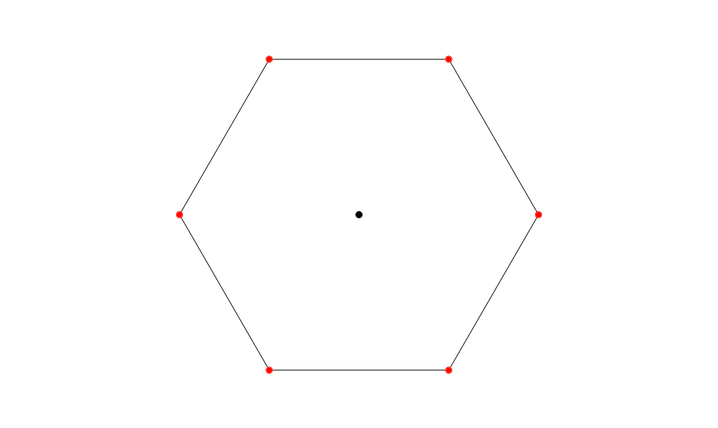

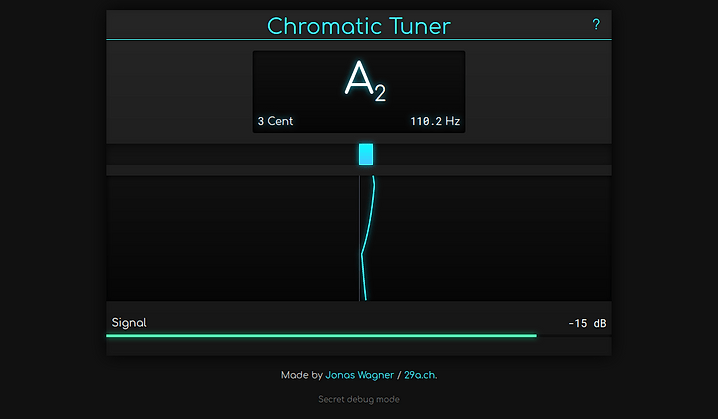 Try the chromatic tuner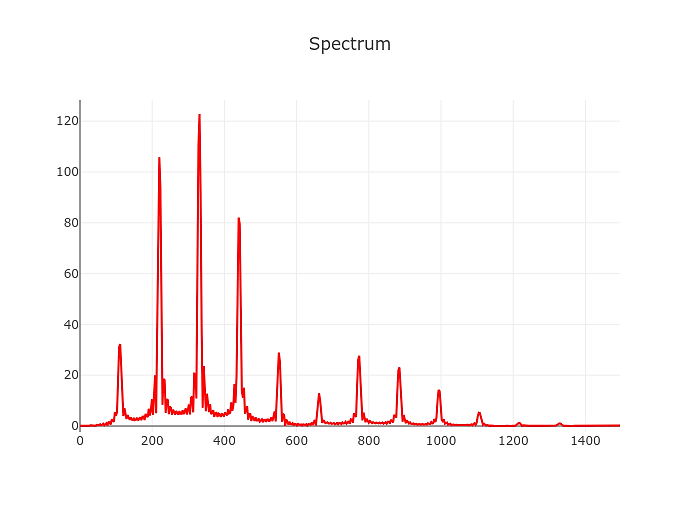
 Onset Locking